Lovable, Bolt and Supabase
Use JobsPipe in an app built with Lovable or Bolt - keep the API key in a Supabase Edge Function secret, call JobsPipe from the function, and call the function from your app. Includes a complete Edge Function and a prompt to paste into the builder.
Lovable and Bolt build apps whose code runs in the browser, with a Supabase project as the backend. To show JobsPipe jobs in such an app, put a small Supabase Edge Function between the app and JobsPipe: the function holds your API key and calls POST /v1/jobs/search, and the app calls the function.
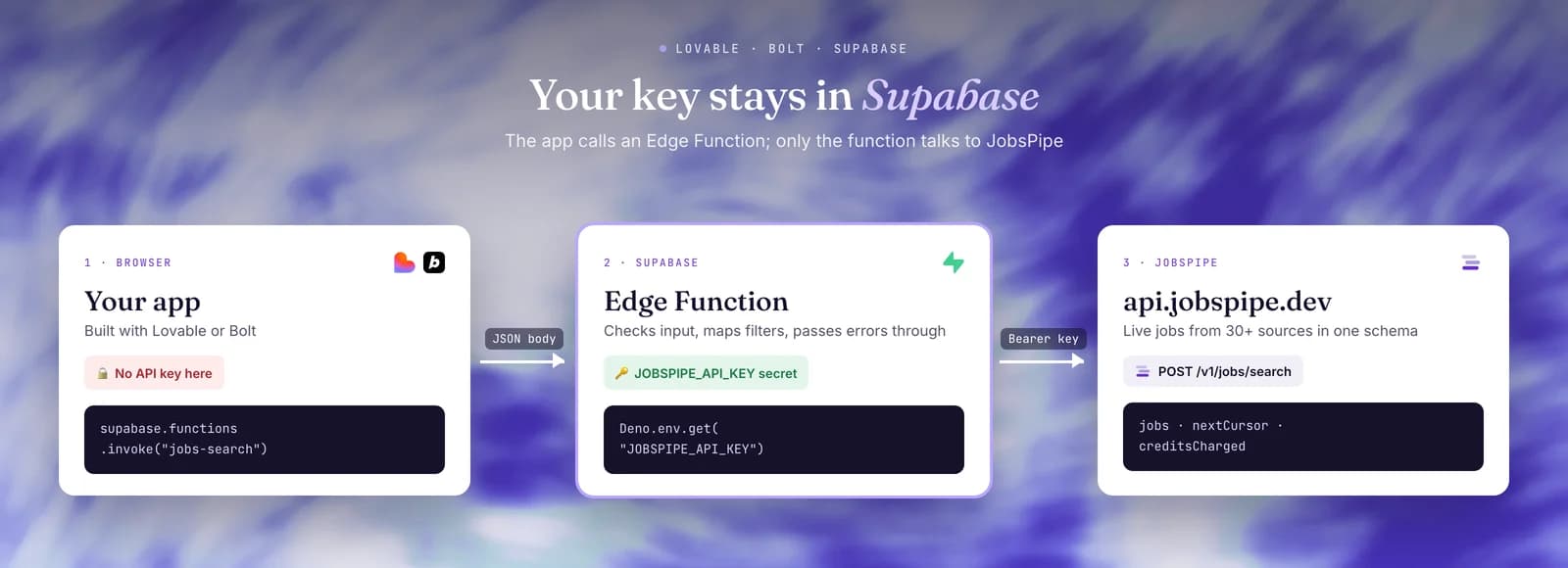
Never put the API key in the app
Do not paste your jp_live_ key into a Lovable or Bolt chat, a React component, a .env file with a VITE_ prefix, or any other front-end code. Everything the browser loads is public: anyone who opens your site can read the key from the page source or the network tab and spend your credits.
The key belongs in a Supabase secret. Edge Functions read secrets with Deno.env.get(...), and they never reach the browser. If a key was ever shipped in front-end code, revoke it and create a new one.
Before you start
- A JobsPipe API key. Create one in the dashboard under Settings → API Keys; it starts with
jp_live_. See Authentication. - A Supabase project connected to your Lovable or Bolt app. Both builders can create one for you.
- Optional: the Supabase CLI, to set the secret and deploy from your own machine.
To wire everything up before you have a key, point the function at the sandbox: it takes the same body with no key and returns two fixed sample jobs. See Test with the sandbox.
Store the key as a Supabase secret
supabase secrets set JOBSPIPE_API_KEY=jp_live_your_key_hereProject → Edge Functions → Secrets → Add new secret
Name: JOBSPIPE_API_KEY
Value: jp_live_your_key_hereSet the secret yourself rather than pasting the key into the builder's chat. If Lovable or Bolt asks for the key, use its secret or API key form, which stores it as a Supabase secret, not the chat box.
The Edge Function
Save this as supabase/functions/jobs-search/index.ts. It accepts a small JSON body from your app, checks it, turns it into JobsPipe filters, calls JobsPipe with the key from the secret, and returns a trimmed list of jobs with CORS headers so the browser can read it.
const JOBSPIPE_URL = "https://api.jobspipe.dev/v1/jobs/search";
const MAX_LIMIT = 25;

const corsHeaders = {
  "Access-Control-Allow-Origin": "*",
  "Access-Control-Allow-Headers": "authorization, x-client-info, apikey, content-type",
  "Access-Control-Allow-Methods": "POST, OPTIONS",
};

const errorHints: Record<number, string> = {
  400: "JobsPipe rejected the search filters.",
  401: "The JobsPipe API key is missing, invalid or revoked. Check the JOBSPIPE_API_KEY secret.",
  402: "The JobsPipe account is out of credits.",
  403: "The JobsPipe account is not allowed to use the API.",
  429: "Too many requests per second. Wait a moment and try again.",
  502: "The search could not be completed. Try again.",
  504: "The search timed out. Try again, or narrow the filters.",
};

type SearchInput = {
  titles: string[];
  countries: string[];
  remote?: boolean;
  maxAgeDays?: number;
  limit: number;
  cursor?: string;
};

function json(body: unknown, status = 200): Response {
  return new Response(JSON.stringify(body), {
    status,
    headers: { ...corsHeaders, "Content-Type": "application/json" },
  });
}

function stringList(value: unknown, max: number): string[] | null {
  if (value === undefined) return [];
  if (!Array.isArray(value) || value.length > max) return null;
  const cleaned = value.map((item) => (typeof item === "string" ? item.trim() : ""));
  return cleaned.every((item) => item.length > 0 && item.length <= 100) ? cleaned : null;
}

function parseInput(raw: unknown): SearchInput | string {
  if (typeof raw !== "object" || raw === null) return "Send a JSON object.";
  const body = raw as Record<string, unknown>;

  const titles = stringList(body.titles, 10);
  if (!titles || titles.length === 0) return "titles must be 1 to 10 non-empty strings.";

  const countries = stringList(body.countries, 10);
  if (!countries || !countries.every((code) => /^[A-Za-z]{2}$/.test(code))) {
    return "countries must be two-letter ISO codes, e.g. [\"US\", \"GB\"].";
  }

  if (body.remote !== undefined && typeof body.remote !== "boolean") {
    return "remote must be true or false.";
  }

  const maxAgeDays = body.maxAgeDays;
  if (
    maxAgeDays !== undefined &&
    (!Number.isInteger(maxAgeDays) || (maxAgeDays as number) < 1 || (maxAgeDays as number) > 365)
  ) {
    return "maxAgeDays must be a whole number from 1 to 365.";
  }

  const limit = body.limit ?? 10;
  if (!Number.isInteger(limit) || (limit as number) < 1 || (limit as number) > MAX_LIMIT) {
    return `limit must be a whole number from 1 to ${MAX_LIMIT}.`;
  }

  if (body.cursor !== undefined && typeof body.cursor !== "string") {
    return "cursor must be the next_cursor string from the previous page.";
  }

  return {
    titles,
    countries: countries.map((code) => code.toUpperCase()),
    remote: body.remote as boolean | undefined,
    maxAgeDays: maxAgeDays as number | undefined,
    limit: limit as number,
    cursor: body.cursor as string | undefined,
  };
}

function toJobsPipeFilters(input: SearchInput): Record<string, unknown> {
  const filters: Record<string, unknown> = {
    job_title_or: input.titles,
    limit: input.limit,
  };
  if (input.countries.length > 0) filters.job_country_code_or = input.countries;
  if (input.remote !== undefined) filters.remote = input.remote;
  if (input.maxAgeDays !== undefined) filters.posted_at_max_age_days = input.maxAgeDays;
  if (input.cursor) filters.cursor = input.cursor;
  return filters;
}

Deno.serve(async (req) => {
  if (req.method === "OPTIONS") return new Response("ok", { headers: corsHeaders });
  if (req.method !== "POST") return json({ error: "Use POST." }, 405);

  const apiKey = Deno.env.get("JOBSPIPE_API_KEY");
  if (!apiKey) return json({ error: "JOBSPIPE_API_KEY is not set on this project." }, 500);

  let raw: unknown;
  try {
    raw = await req.json();
  } catch {
    return json({ error: "The request body is not valid JSON." }, 400);
  }

  const input = parseInput(raw);
  if (typeof input === "string") return json({ error: input }, 400);

  let upstream: Response;
  try {
    upstream = await fetch(JOBSPIPE_URL, {
      method: "POST",
      headers: {
        Authorization: `Bearer ${apiKey}`,
        "Content-Type": "application/json",
      },
      body: JSON.stringify(toJobsPipeFilters(input)),
    });
  } catch {
    return json({ error: "Could not reach JobsPipe. Try again." }, 502);
  }

  const payload = await upstream.json().catch(() => null);

  if (!upstream.ok) {
    return json(
      {
        error: errorHints[upstream.status] ?? "The job search failed.",
        detail: payload?.error ?? null,
        status: upstream.status,
      },
      upstream.status,
    );
  }

  return json({
    jobs: payload.data.map((job: Record<string, unknown>) => ({
      id: job.id,
      title: job.job_title,
      company: job.company,
      location: job.location,
      remote: job.remote,
      posted: job.date_posted,
      url: job.source_url,
    })),
    nextCursor: payload.metadata.next_cursor,
    creditsCharged: payload.metadata.credits_charged,
  });
});
What the function does:
- Checks the input before it spends anything. A search that JobsPipe rejects with
400still costs 1 credit, so the function refuses bad input itself: 1 to 10 titles, two-letter country codes, a booleanremote,maxAgeDaysfrom 1 to 365. - Caps the page size.
limitis at most 25 per call, the page size on Free. Each job costs one credit the first time you receive it in a calendar month, so a cap keeps a busy page from spending more than you expect. RaiseMAX_LIMITif your plan allows larger pages and you want them. - Maps your app's names to JobsPipe filters.
titlesbecomesjob_title_or,countriesbecomesjob_country_code_or,maxAgeDaysbecomesposted_at_max_age_days, andremote,limitandcursorpass through. To add a filter, add a field toparseInputand map it intoJobsPipeFilters, using a name from the filter reference. JobsPipe rejects names it does not have. - Passes errors through. A JobsPipe error keeps its status code and comes back as
{ "error", "detail", "status" }, wheredetailis the message from JobsPipe. - Pages with a cursor.
nextCursoris JobsPipe'smetadata.next_cursor. Send it back ascursorwith the same filters for the next page; it isnullon the last page. See pagination.
Errors your app should handle
| Status | Meaning | What the app should do |
|---|---|---|
400 | The function or JobsPipe rejected the input. | Show the error message. Do not retry the same input. |
401 | The JOBSPIPE_API_KEY secret is missing, wrong or revoked. | Fix the secret, then redeploy. Not something a visitor can fix. |
402 | The JobsPipe account is out of credits. | Show "search is unavailable". Retrying does not help: wait for the monthly reset, buy credits or upgrade. |
403 | The JobsPipe account is not allowed to use the API. | See 403 Forbidden. |
429 | Too many requests in one second for your plan. | Wait a moment and retry, with backoff. |
502, 504 | The search failed or timed out. | Retry; for a 504, narrow the filters. |
401, 402 and 429 cost nothing, and neither does a search that fails with 502 or 504. See errors and rate limits.
Deploy it
Lovable and Bolt deploy Edge Functions they create in your connected Supabase project. From your own machine, deploy with the CLI:
supabase functions deploy jobs-searchSupabase checks the caller's Supabase token on every Edge Function call by default, and supabase.functions.invoke in your app sends it for you. Keep that check on.
The Supabase anon key in your app is public, so anyone can call a function that only needs the anon key. If your app has sign-in, make the function answer only signed-in users, and keep the limit cap. Every job the function returns is charged to your JobsPipe account.
Call it from the app
import { supabase } from "@/integrations/supabase/client";

const { data, error } = await supabase.functions.invoke("jobs-search", {
  body: { titles: ["data engineer"], countries: ["US"], remote: true, maxAgeDays: 7, limit: 10 },
});

if (error) {
  const { error: message } = await error.context.json();
  showError(message);
} else {
  renderJobs(data.jobs);
}
The import path is where Lovable puts the Supabase client; in a Bolt project, import the client from wherever the project creates it. showError and renderJobs stand for your own UI code.
Prompt to paste into Lovable or Bolt
Set the JOBSPIPE_API_KEY secret first, then paste this into the chat. It asks for the function above and a search page, and tells the builder where the key must stay.
Add job search powered by the JobsPipe API.

1. Create a Supabase Edge Function named "jobs-search" with exactly the code from
   https://docs.jobspipe.dev/integrations/lovable-bolt-supabase (section "The Edge Function").
   It reads the API key with Deno.env.get("JOBSPIPE_API_KEY"). The secret is already set in
   Supabase. Never put the key in front-end code, a VITE_ variable, or this chat.

2. Build a job search page that calls the function with
   supabase.functions.invoke("jobs-search", { body }), where body is
   { titles: string[], countries: string[], remote?: boolean, maxAgeDays?: number, limit?: number, cursor?: string }.
   The form has: job titles (comma separated), countries as two-letter codes (for example US, GB),
   a "remote only" toggle, and "posted in the last N days".

3. Show each job in data.jobs as a card with title, company, location, a Remote badge when
   remote is true, the posted date, and an "Apply" link to url that opens in a new tab.

4. Show a "Load more" button while data.nextCursor is not null. It sends the same filters plus
   cursor: data.nextCursor and appends the results.

5. On an error, read the JSON body of the error response and show its "error" message.
   Show a loading state while a search runs. Do not search on every keystroke; search when the
   form is submitted.
The result is a page like this one: a search form, one card per job with a Remote badge and an Apply link, and a Load more button.
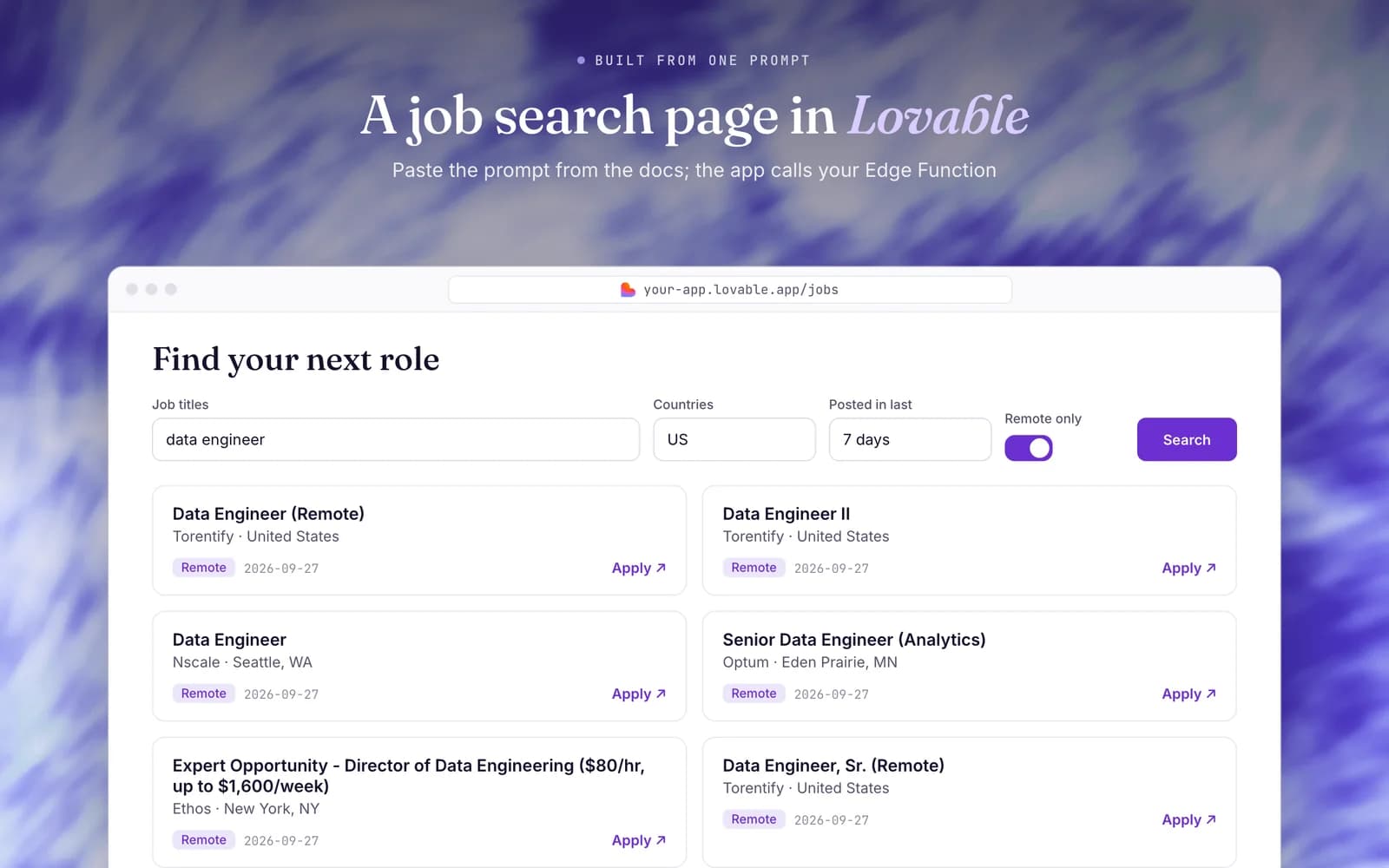
If the builder rewrites the function, check that it still reads the key from Deno.env.get("JOBSPIPE_API_KEY"), still calls https://api.jobspipe.dev/v1/jobs/search, and only sends filter names from the filter reference.
Test with the sandbox
To build the UI before you have a key or credits, change JOBSPIPE_URL in the function to the no-key sandbox:
const JOBSPIPE_URL = "https://api.jobspipe.dev/v1/sandbox/jobs/search";The sandbox returns the same two sample jobs whatever the filters say and needs no secret, although the function still expects JOBSPIPE_API_KEY to be set; any value works. When the page works, change the URL back and set your real key. See Prototype with the sandbox.
Related
- Plain-language search for AI apps: let users type a sentence instead of filling a form.
- Filters and the job schema: everything you can search on and get back.
- JobsPipe MCP server: give an AI agent job search as a tool, with no function to write.